Elevate Your Audio Experience with Bluetooth Audio Receiver
Bluetooth Audio Receiver, developed by Mark Smirnov, is a lightweight Windows utility that lets your PC act as a Bluetooth speaker for other devices. It allows music or media from phones and tablets to play wirelessly through your computer’s speakers, creating a simple bridge between your mobile device and desktop setup. The app’s purpose is focused and practical—streamlining how you enjoy audio across devices without extra hardware.
Top Recommended Alternative

A Smarter Way to Manage Wireless Audio
One of the most appealing aspects of Bluetooth Audio Receiver is its convenience and simplicity. You can play and control music directly from your phone while it streams through your computer, giving you freedom of movement without cables. This wireless setup enhances productivity or entertainment by freeing your workspace from clutter, allowing easy control of playback and volume from your mobile device.
User-Friendly Connectivity for All Skill Levels
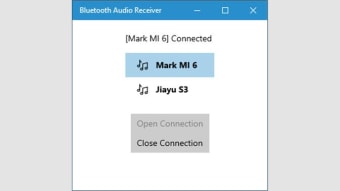
Connecting your devices is straightforward. After pairing your phone with your computer through Windows Settings, you simply open the app and select your device to start streaming. The clear interface and minimal steps make it accessible even for beginners. Whether you use it for casual listening or background audio during work, the app’s setup process ensures a seamless, user-friendly experience for any technical level.
Understanding Audio Quality Factors
Audio quality depends mainly on your hardware and Bluetooth drivers. The app uses the A2DP sink profile, meaning it supports media playback but not hands-free calls. Performance can vary based on Bluetooth adapters, codec compatibility, and signal strength. While streaming is convenient, wired connections generally provide more consistent sound quality—a natural trade-off for the flexibility of wireless use.
Enhancing Your Everyday Listening Setup
Bluetooth Audio Receiver is ideal for users who want a quick, reliable way to stream audio from mobile devices to their PCs. It’s completely free, requires no complex configuration, and integrates smoothly with Windows 10 and 11. Although sound quality and performance depend on your system’s Bluetooth hardware, its simplicity and ease of use make it a handy companion for casual listening or work environments.